As temperatures drop in Colorado, homeowners start preparing their HVAC systems for the cold months ahead. Switching your thermostat from cooling to heating might seem simple, but doing it the right way keeps your system efficient and prevents unnecessary wear. A smooth transition ensures your furnace or heat pump runs safely and your home stays comfortable throughout winter.
At Greeley Furnace Heating & Air, we’ve helped Northern Colorado families stay warm since 1958. With decades of experience handling seasonal changeovers, our team knows that small steps, like switching your thermostat correctly, can make a big difference in comfort, energy savings, and system performance.
Why It’s Important to Switch the Right Way
Switching your thermostat too quickly between cooling and heating can strain your HVAC system. The unit needs time to reset internal pressures before changing modes. Without that pause, pressure can build up in the compressor and cause avoidable wear or even failure.
Here’s what can go wrong if you rush the switch:
- Compressor damage: Sudden mode changes create high internal pressure that stresses vital components.
- Short cycling: The system turns on and off repeatedly, wasting energy and reducing equipment lifespan.
- Reduced efficiency: Your HVAC works harder than necessary, leading to uneven temperatures and higher utility bills.
Pro tip: Always wait at least five minutes between switching modes. This pause lets refrigerant pressure equalize and keeps your system protected.
If you hear strange noises, feel uneven airflow, or notice slow heating response, it may be time for a quick system check before winter arrives.
When Should You Switch from Cooling to Heating?
For most homeowners, the right time to switch to heating mode is when night temperatures drop to around 50–60°F. That’s when your home starts needing consistent warmth to stay comfortable.
In Northern Colorado:
- Late September to early October is usually ideal for switching.
- Sudden weather swings are common, so test your heat early to catch issues before the first cold snap.
- Run your heating system for a short cycle to confirm it’s ready for the season.
Watch for these comfort factors:
- Humidity: Dry fall air can make rooms feel colder than they are.
- Temperature drops: Fluctuations can trick thermostats into running longer than needed.
- Ideal thermostat setting: Keep it around 68°F during the day for balance between comfort and efficiency.
Switching at the right time and testing early ensures your system stays reliable before the real chill sets in.
Step-by-Step Guide to Switching from Cooling to Heating
Switching your thermostat from cool to heat mode is simple, but a few careful steps can prevent strain on your HVAC system and keep it running smoothly. Follow this short, practical guide to do it the right way.
Step 1: Turn Off Your HVAC System
Always power down before changing modes. Turning it off at the thermostat or breaker stops electrical flow and protects the compressor from pressure surges.
- Wait at least five minutes to let the system fully stop running.
- Avoid flipping from cool to heat instantly, that’s when most stress occurs.
Step 2: Clean or Replace Air Filters
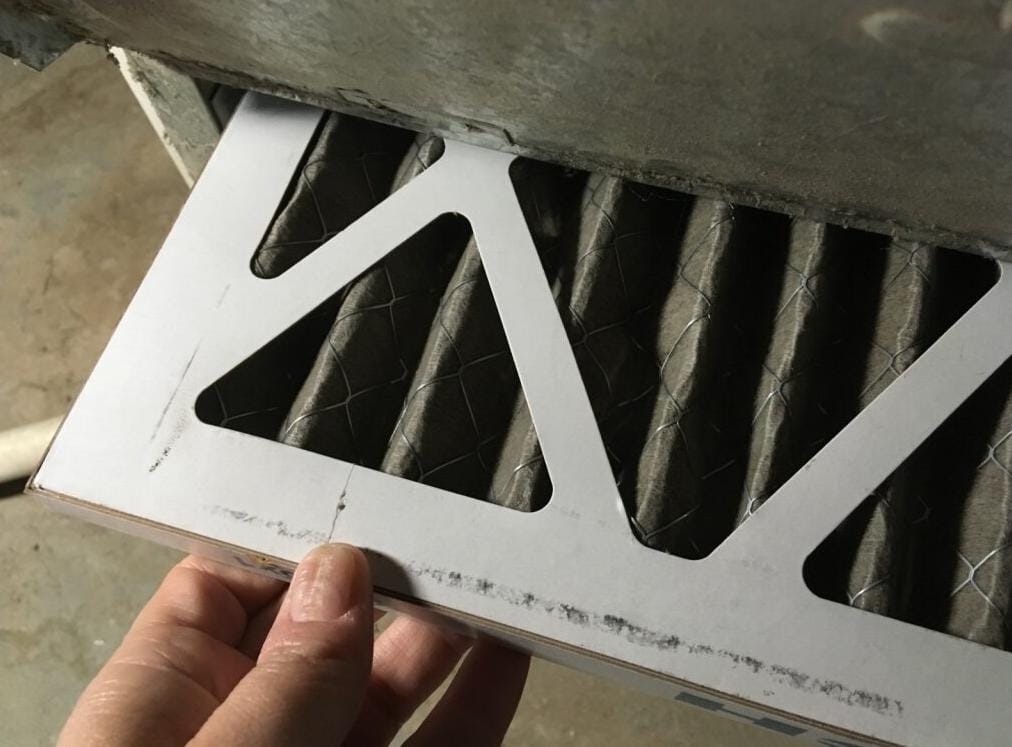
A dirty filter can block airflow and cause your system to overwork. Before heating season starts:
- Check your filter and replace it if it looks dusty or grey.
- Clean reusable filters with mild soap and water.
- Replace disposable ones every 1–3 months.
Clean filters mean better air quality, lower energy use, and fewer breakdowns.
Step 3: Inspect Vents and Outdoor Units
Blocked vents or outdoor coils can restrict airflow and hurt efficiency.
- Make sure vents are open and not covered by furniture or rugs.
- Wipe dust off vent grilles.
- For outdoor units, clear away leaves, grass, or debris.
Good airflow keeps your system heating evenly and safely.
Step 4: Switch the Thermostat Mode to “Heat”
Now you’re ready to change the setting.
- On most thermostats, press the Mode button or move the switch from Cool to Off then to Heat.
- Wait a few seconds for the display to confirm the new mode.
- If your thermostat screen doesn’t change, check the batteries or circuit breaker.
Smart thermostats may switch automatically, but a quick manual check ensures it’s ready for heat mode.
Step 5: Set a Comfortable Temperature and Wait
Set your thermostat a few degrees above room temperature to prompt the heat to turn on.
- Give your system at least five minutes before it starts producing warm air.
- Don’t keep adjusting the setting, it won’t heat faster and can confuse the system.
That short wait lets the compressor pressure stabilize and prevents short cycling.
Step 6: Turn the System Back On and Monitor Performance
Power your system back on and make sure everything sounds right.
- Listen for a smooth blower sound instead of rattling or clicking.
- Feel for warm air coming from the vents within a few minutes.
- Watch for steady operation without sudden stops or restarts.
If you notice weak airflow, cool air, or odd noises, it’s a sign to call your HVAC professional for a quick inspection before the cold weather sets in.
Understanding Your Thermostat Type
Knowing your thermostat type helps you switch modes correctly and avoid unnecessary confusion. Each model works a little differently, and understanding the basics makes the process smoother and safer for your system.

Manual Thermostats
These are the simplest type and often have a physical switch or dial.
- Move the selector from Cool to Off, then to Heat.
- Wait a few minutes before turning the system back on.
- Make sure the fan setting is on Auto for normal operation.
If your thermostat feels unresponsive or the display doesn’t light up, check the batteries or the circuit connection before assuming there’s a system issue.
Programmable Thermostats
Programmable thermostats let you set heating and cooling schedules in advance.
- Update your programmed times and temperatures for the colder months.
- Double-check that the Heat mode is selected and the schedule reflects your new comfort needs.
- Avoid leaving the thermostat on Auto Changeover if your area experiences big temperature swings, it can cause the system to switch back and forth too often.
This small adjustment keeps your system from short cycling and saves energy through the season.
Smart Thermostats
Smart thermostats can manage the seasonal change for you.
- They connect to Wi-Fi and use sensors or weather data to adjust automatically.
- Most can switch between heating and cooling when needed, but you should still confirm the settings at the start of each season.
- Check for software updates to ensure proper function and energy tracking.
Smart thermostats are great for convenience and efficiency, especially if you’re away often or prefer remote control through an app.
Troubleshooting Common Issues When Switching Modes
Even when you follow every step correctly, your thermostat or HVAC system might not respond as expected. Here’s how to spot and fix common problems before they turn into bigger ones.
- The thermostat shows heat mode but no warm air: Check that the system is actually running. If your furnace doesn’t ignite or the air feels cold after several minutes, it may be a fuel supply issue, ignition fault, or blocked burner.
- System runs but air stays cool: This often points to a heat pump reversing valve problem. The valve may be stuck, preventing the system from switching from cooling to heating mode. A technician can inspect and reset it safely.
- Fan runs constantly: If the fan keeps running even when the system is off, your fan setting might be set to On instead of Auto. Switch it back to Auto so it runs only when heating or cooling is active.
- Thermostat batteries or calibration issues: Replace the batteries if the display flickers or lags. Older thermostats may also need recalibration to read temperatures accurately.
If your system still doesn’t produce heat or cycles repeatedly, it’s best to call a professional HVAC technician. Greeley Furnace can inspect, clean, and test your system before winter fully sets in, ensuring everything runs safely and efficiently.

Optimize Settings for Comfort and Energy Efficiency
Once your system is running properly, the next step is fine-tuning your settings to stay comfortable while keeping energy bills under control.
Recommended thermostat temperatures for winter:
- 68°F during the day when you’re home
- 62°F at night or when you’re away
These settings strike a good balance between comfort and energy use. Each degree lower can save around 1–2% on your heating costs.
Smart thermostat features can help:
- Adaptive or learning modes adjust temperatures automatically based on your habits.
- Geofencing detects when you’re away and lowers the heat to save energy.
- Usage reports show where you can cut waste and improve efficiency.
Try the setback strategy: Lower your temperature slightly when sleeping or out of the house. Studies show this can reduce heating consumption by 4–9% without noticeable discomfort.
When to Call a Professional HVAC Technician
Even with proper thermostat use, some problems need expert attention. Recognizing the warning signs early helps prevent costly repairs later.
Call a professional if you notice:
- Short cycling: The system turns on and off every few minutes.
- Unresponsive controls: The thermostat doesn’t change temperature or display correctly.
- No heat or weak airflow: Warm air doesn’t circulate through vents, or rooms heat unevenly.
- Strange noises or smells: Rattling, burning, or musty odours often indicate mechanical or electrical issues.
Booking a professional tune-up before winter has several benefits. It ensures your furnace or heat pump runs safely and efficiently, reduces the risk of mid-season breakdowns, and improves indoor air quality through cleaning and filter maintenance. Regular inspections also help extend the lifespan of your equipment by catching minor problems early.
During a seasonal inspection, a technician will:
- Check and clean the burners, filters, and ignition system.
- Inspect wiring, safety switches, and electrical connections.
- Test airflow, thermostat calibration, and heat output.
- Verify that all components are working smoothly.
If you’re getting ready for another Northern Colorado winter, now’s the perfect time to schedule your maintenance.
Frequently Asked Questions
How long should I wait between cooling and heating?
Wait at least five minutes before switching from cooling to heating. This short pause allows internal pressures in your HVAC system to stabilize, preventing damage to the compressor and helping your system run more smoothly.
Why won’t my thermostat switch to heat mode?
If your thermostat won’t change modes, check the batteries and make sure it’s set to Heat instead of Auto. If it still doesn’t respond, the issue could be with the wiring or the HVAC system itself. A professional technician can diagnose whether the problem is in the thermostat or the heating unit.
Can I use Auto mode instead of switching manually?
Some programmable and smart thermostats include an Auto mode that switches between heating and cooling automatically. While it’s convenient, manual switching is usually safer in areas like Northern Colorado, where fast temperature changes can cause unnecessary cycling and wear on your system.
How to know if my thermostat is in heating mode?
When in Heat mode, your thermostat display should show the word “Heat” or a flame icon. After setting a temperature higher than the current room temperature, you should hear the furnace or heat pump activate within a few minutes.
Do all thermostats automatically switch between heat and cool?
No, not all thermostats have this feature. Only certain smart or programmable thermostats offer automatic switching. Manual thermostats require you to change modes yourself, which actually helps reduce strain in climates with sudden temperature swings.
Should I replace my thermostat before winter?
If your thermostat is older, inaccurate, or frequently unresponsive, replacing it before winter is a smart move. Modern programmable and smart thermostats improve efficiency and give better temperature control. An HVAC professional can recommend one that fits your home’s heating setup.
Final Thoughts
Switching your thermostat from cooling to heating the right way isn’t just about comfort, it’s about protecting your HVAC system and keeping your energy bills in check. Taking a few careful steps, like waiting between modes and checking filters, prevents wear and helps your furnace or heat pump run efficiently all winter long.
For Northern Colorado homeowners, now is the perfect time to prepare for the cold season. A quick maintenance visit ensures your system is clean, safe, and ready to deliver reliable warmth when you need it most.
Schedule your seasonal maintenance with Greeley Furnace Heating & Air, proudly serving the community since 1958 with trusted heating and cooling care that keeps homes comfortable year after year.